 Windows app · free
SCMFARM — your Steam cards drop by themselves
A small program for your PC: it keeps your games "running" in the background, so Steam drops their trading cards without you playing. Cards become badges, badges become levels, levels open new showcase slots.
Looking for the newest version…
What it does
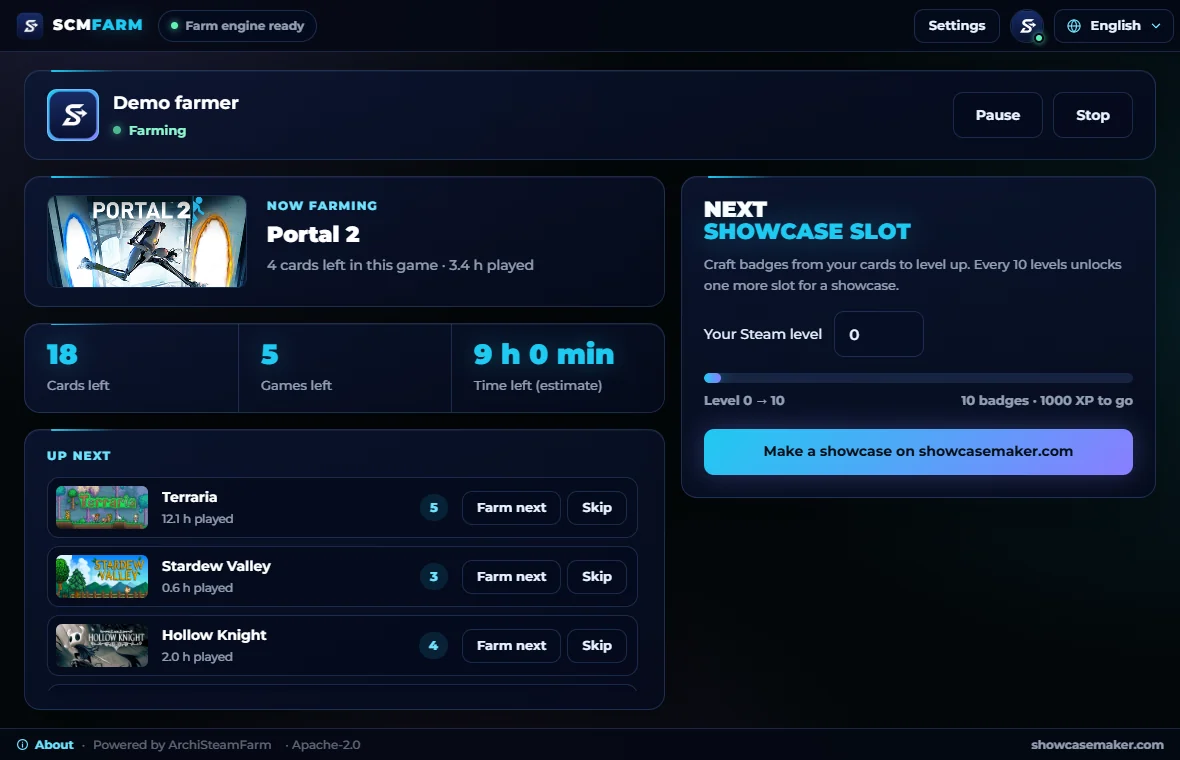
Steam gives trading cards for the time you spend in games you own. SCMFARM tells Steam that those games are running, one after another, without downloading or starting them. When a game has no drops left, it moves on to the next one. You keep using your PC, or leave it alone.
- Cards without playing
Games are not downloaded or launched. Nothing on your disk changes, the game files stay untouched.
- QR sign-in
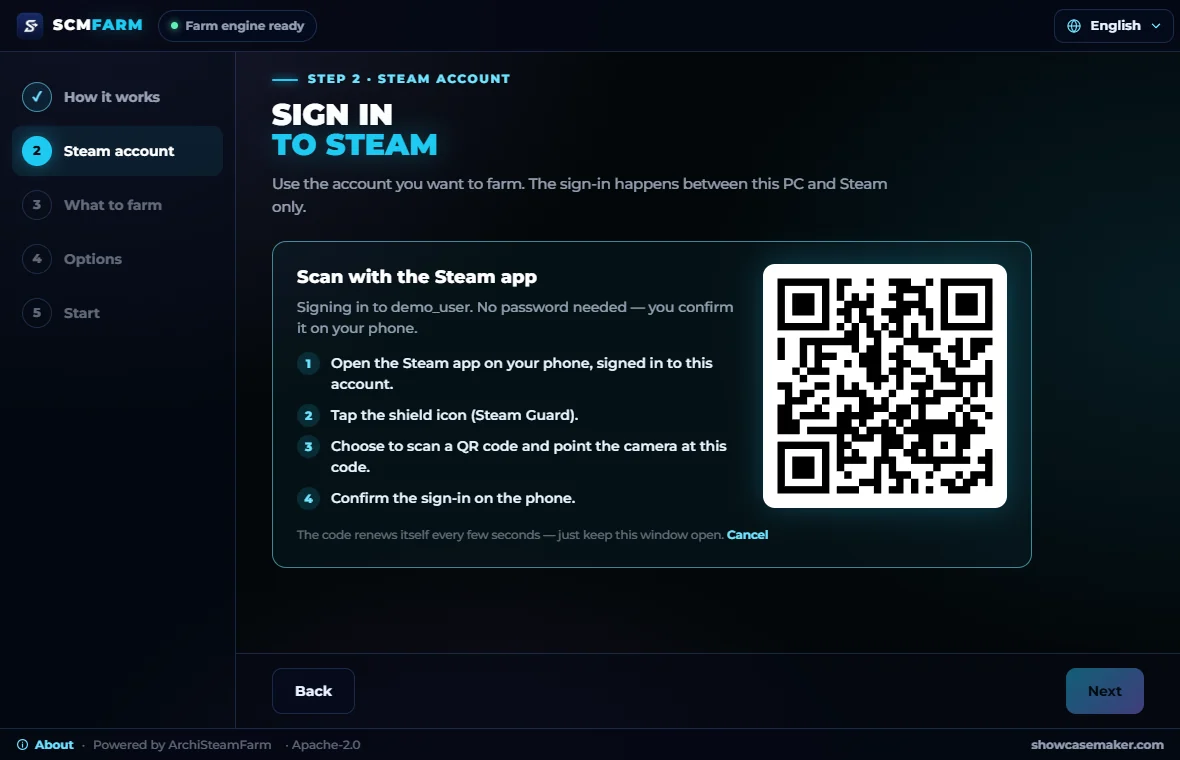
Scan a code in the Steam app and confirm. Steam then remembers this PC for months.
- Steps aside when you play
Start any game on the same account and farming waits; it continues after you quit.
- Your next showcase slot
The app counts how many badges you still need until the next showcase slot opens.
- Tray and autostart
Close the window and it keeps working in the tray. It can start with Windows and continue by itself.
- Updates itself
Every start checks for a new version, downloads it and restarts. Each update is signed, so only ours is installed.
How to start
- Download and run
One file, SCMFARM.exe. No installer, no admin rights. The first start downloads the farm engine (about 20 MB).
- Sign in to Steam
With a QR code in the Steam app, or with your login and a Steam Guard code.
- Choose what to farm
All games with cards left, or only the ones you pick, and in which order.
- Let it run
Cards drop into your inventory. Craft badges from full sets and your Steam level grows.
From cards to a better profile
Every 10 Steam levels open one more showcase slot on your profile. When the slot is there, fill it on Showcase Maker: cut your art for the Workshop, Featured or Artwork showcase, or build a design from scratch.
Make a showcaseSteam sales and events
Seasonal sales are the time to collect free stickers in your discovery queue and the event badge in the Points Shop; SCMFARM shows the next sale on its dashboard too.
- Steam Winter Sale17 Dec 2026 – 4 Jan 2027 · starts in 28 d.stickers and an event badge
- Steam Next Fest22 Feb 2027 – 1 Mar 2027 · starts in 95 d.
- Steam Spring Sale18 Mar 2027 – 25 Mar 2027 · starts in 119 d.stickers and an event badge
Levels and cards in numbers
A badge is 100 XP, a game badge goes up to level 5, and every 10 levels open a new showcase slot. See what your next level costs in card sets and learn how cards work.
Safety and privacy
- Your password stays between you and Steam
It goes from the window to the farm engine on this PC and from there to Steam. It is never saved, never sent to us.
- Open source
SCMFARM and its engine ArchiSteamFarm are open source. Anyone can read what the program does.
- The engine, unchanged
Farming is done by ArchiSteamFarm by JustArchi, the well-known open engine, run exactly as published.
- No telemetry
No analytics, no tracking. The only call to our site is the version check at start.
- Signed updates
An update is installed only when its signature matches the key built into the program.
New programs without a well-known signature get a SmartScreen warning at first. Click "More info" and then "Run anyway". We are getting SCMFARM signed through the SignPath Foundation programme for open-source projects; after that the warning goes away.
Requirements
| System | Windows 10 or 11, 64-bit |
|---|---|
| Disk | about 100 MB (program, engine and its data) |
| Internet | needed while farming |
| Steam | an account with paid games that have trading cards |
| Window engine | Microsoft WebView2, already part of Windows 10 and 11 |
Removing it
Open "About" in the program and press "Remove SCMFARM from this PC". It stops farming and deletes the engine, the Steam sign-in, the settings, the autostart entry and the program file itself.
Questions
Is it free?
Yes. SCMFARM is free and has no paid features.
How many cards will I get?
About half of each game's set: that is how Steam drops cards. The rest come from trades, the market or booster packs.
Do free games drop cards?
Usually not. Cards drop from games you bought; free games and giveaway copies mostly give nothing.
Can I play while it farms?
Yes. When you start a game on the same account, farming steps aside and continues after you quit.
Does it touch VAC or game files?
No. Games are not downloaded or started and no game files are changed; SCMFARM only tells Steam which game is "running".
Do I have to keep the window open?
No. Close it and SCMFARM keeps working in the tray. Right-click the tray icon to quit.
Can I use several accounts?
One account at a time for now. Support for several accounts is planned.
Ready to collect your cards?
Download SCMFARM, sign in and let your games drop their cards while you do something else.
Looking for the newest version…